
Everything shift work is about.
Grouped like the app's main menu. Almost everything works the same on Android and iPhone. What is only on Android is listed at the end.
Plan the way your workplace plans.
Your own shifts
With name, short code, colour, start, end and breaks. For each shift you decide how it is paid.
Quick planning
Pick a shift and swipe across the days. A whole month is entered in seconds.
Interval planner
Set your rotation once, for example continuous shifts, with a preview of the first four weeks. Either replace existing shifts or only fill empty days.
Undo
You can undo the last ten changes in the calendar with one tap.
Replace shifts
Replace a shift with another one within a period, or delete it, for example after a new duty roster.
Rules
Automatic premiums, deductions or breaks based on fixed conditions, with ready-made templates.

More than a duty roster.
Three views
Month, list and day. The year overview shows twelve small months, with a filter, for example for all night shifts.
Public holidays and school holidays
For your federal state, clearly highlighted if you like. School holidays are available for Germany.
Recurring appointments
Every second Tuesday, last Friday of the month or “on days off”, matching your shift plan. You can change single appointments without losing the series.
Reminders and photos
Appointment reminders and a photo on the appointment that stays on the device only.
Weather and sunrise
In the calendar and in the day view, for where you live. Plus the moon phase and “What happened on this day”.
Awareness days and name days German only
Below the date, the app quietly shows the awareness day, such as “Tag des Popcorns” (Popcorn Day), and whose name day it is.
Birthdays
Right in the calendar, between your shifts.

Hourly wage or salary
With pay rises from a given date, as a percentage or amount, with history.
Shift premiums
Night, Sunday and public holiday under § 3b EStG, plus your own premiums from your collective agreement.
Taxes and contributions
Wage tax (Lohnsteuer) for all tax classes, also IV with factor, solidarity surcharge, church tax, statutory or private health insurance, Midijob and Minijob.
Special payments
Holiday pay and Christmas bonus as one-off payments (sonstige Bezüge), plus commission, expenses and commute.
Tax report
The whole year as PDF for the Anlage N: working days, trips, expenses and premiums to check against.
Finance overview
Accounts, fixed expenses and income with a forecast. Always stays on your device only.

Every hour in view.
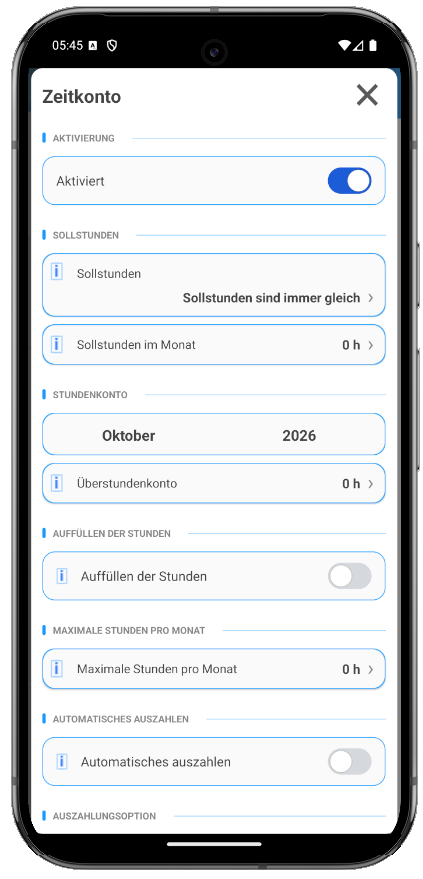
Time account and overtime
Target hours by working days, core working time, payout and reduction, carried forward across the months.
Time tracking
With big start and stop buttons, for when the shift goes differently than planned.
Leave
With remaining leave. With an hourly wage, paid at the average of the last three months.
Sickness
Your own sick shifts, with an hourly wage paid at the average of the last three months.
More time off with less leave.
With your shift plan
A public holiday on which you work stays a working day. Days off in your rotation make the block longer.
Suggestions with leverage
“1 day of leave → 4 days off in a row”, sorted by the best ratio.
Enter with one tap
Show it in the calendar, enter the leave and undo it if needed. You keep an eye on your remaining leave.

Tasks that know your duty roster.
Based on the shift plan
Due on the “next day off”, “before the next night shift” or “after your leave”. If you change your plan, the date moves with it.
Before every shift
Recurring tasks, for example washing your work clothes before every early shift.
Around your leave
Packing list and tasks that follow your leave.
Your app, your data.
21 layouts
Light and dark ones, with a live preview before you switch. You can also set colours and font sizes individually.
Several users
For your partner or a second job, each with their own shifts and their own pay.
WebSync
Sync between devices, partner and family. More on the WebSync page.
Backup
Automatic every day, share and restore your own backups.
Help in the app
Fully offline, with search, and quick help [i] on more than 150 settings.
Search in the main menu
“Night premium” finds the shift premiums, a date jumps to the calendar.

The shift alarm.
An alarm clock that knows your duty roster. You set it once per shift, and it rings at the right time on every day with that shift. On days off it stays quiet.
Per shift
A fixed time or a set time before the shift starts. For a single day, you turn it off in the day view or set a different time.
Plans ahead by itself
The app schedules the alarm 30 days in advance and keeps rescheduling, also when you change shifts.
Your sound
Default sound, device sounds or your own file. Snooze for 5, 10, 15 or 20 minutes. “Test” plays it right away.
Reliable
“Reliability” checks notifications, exact alarms, full-screen display and battery optimisation, and helps you fix problems.
Widgets
A large widget with the month and a small one with the next shifts, with appointments if you like.
Google Calendar
Transfer shifts, appointments and notes to a separate Google calendar. In safe mode, data only goes from the app to Google.
Statistics and Excel
Count per shift, longest run of working days, longest leave, best net pay months. You can also export a month as an Excel file.