
Your shift plan, with everyone who needs it.
WebSync syncs your data between phone, tablet and iPhone, shows your partner your shifts in their own calendar and gives your family a link that you can take back at any time.
Who sees what?
Two shift plans, one calendar.
Set yourselves up as users in the same WebSync account. Each of you keeps your own shifts and your own pay, and each of you sees the other's shifts in the month, list and day view.
- In their coloursYour partner's shifts appear as short codes in the colours they picked.
- Show or hideSeparately for each user, if the calendar gets too full.
- Share appointmentsNew and changed appointments automatically appear for the other person too.
- Private stays privateA switch in the appointment keeps it out of the shared calendar.

“Can I call you tonight?”
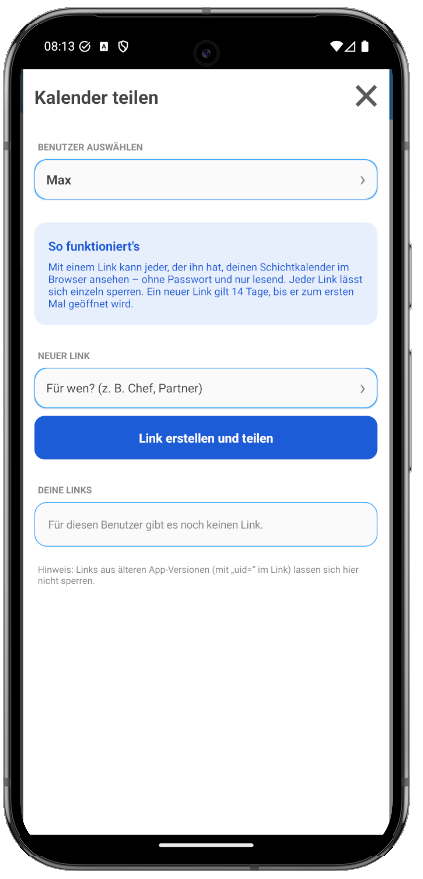
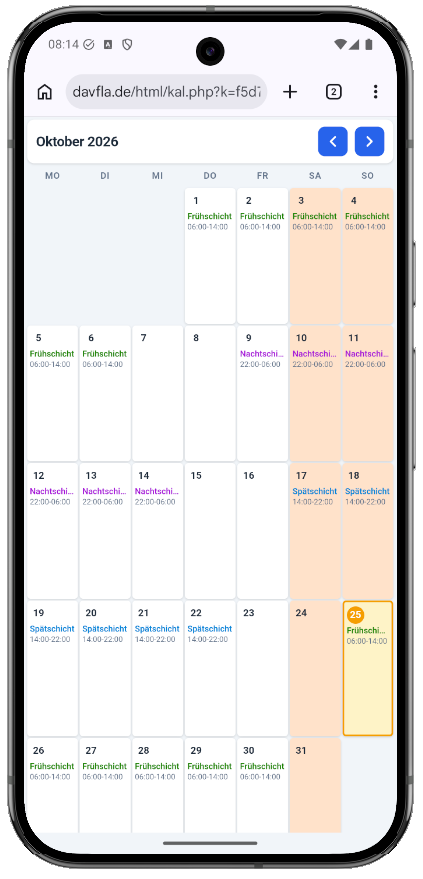
Send your parents, brothers and sisters or friends a link. They see your shift plan in the browser, without the app and without a password, and know when you are on night shift and asleep during the day. If you no longer want that, you revoke the link with one tap.
Set up in three steps.
- 1
Create an account
In the WebSync menu, with a device name, a password and ideally an email address. The app assigns a WebSync ID.
- 2
Sign in on the second device
With your email or WebSync ID and password. On the new device, choose “Server” as the source of the data.
- 3
Done
From now on, syncing runs by itself. Changes reach all devices after about 45 seconds.
New phone, different system?
You move from Android to iPhone or back with WebSync. All users, shifts and appointments come along, and so does the full version. You don't have to buy it again.
Everything for the plan. Nothing from your accounts.
Is synced
- All users
- Shifts and monthly data
- Appointments and notes
- Shift templates
- Settings, including those for the pay calculation
- The full version
Stays on the device
- Finance overview with accounts and expenses
- Layouts
- Alarm sounds
You decide.
WebSync is optional. In the WebSync menu you can pause syncing, sign out or delete the account on the server.
See all questions →Does WebSync cost anything?
No. WebSync is free and stays free even without the full version.
Do I need an email address?
No. Without an email address, you sign in with the 10-digit WebSync ID and your password. With an email address you can reset a forgotten password, which is why we recommend it.
My partner has their own account. Do they see my shifts?
In their own calendar only if you are both set up as users in the same WebSync account. With separate accounts, send them a calendar link instead.
What does someone see if I send them a link?
Your monthly calendar in the browser with shift names and working times, view only. Appointments, notes and pay are not visible. The recipient does not need a password.
Can I take a link back?
Yes. You can revoke each link separately in the app. After that it no longer shows the calendar. The other links keep working.
How do I delete my data on the server?
In the WebSync menu with “Delete user”. This removes the account from the server. The data on your device stays.
WebSync is already built into the app.
Main menu › Settings & data › WebSync. Free, even without the full version.